The loyalty program has now come to an end. If you had points remaining in your account, don’t worry: we’ve converted them into a coupon equal to the value of your points, which you can use towards your next purchase on our site.
How to find your coupon
- Log in to your account.
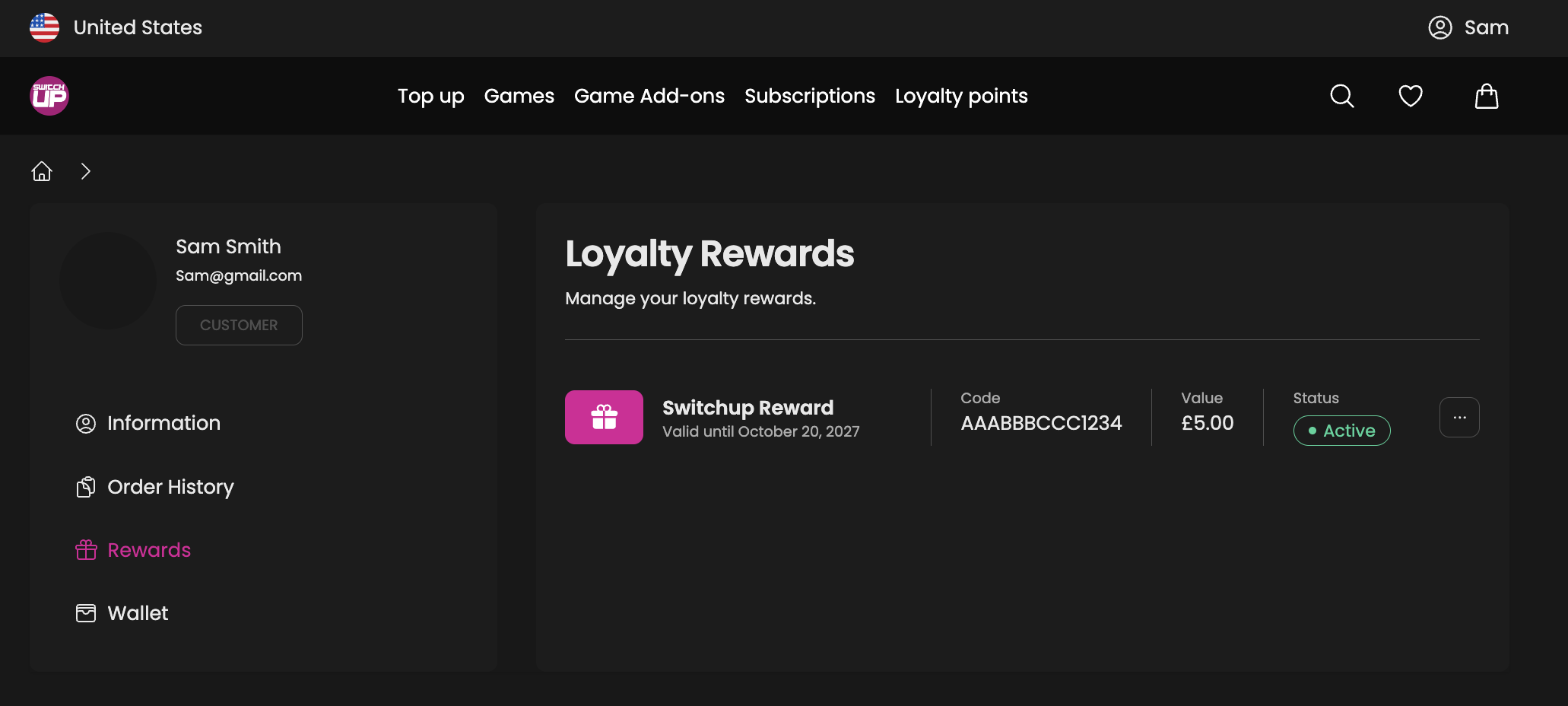
- Go to My Account > Rewards.
- Your coupon code and its value will be shown there.
Important: Make sure you log in with the same email address that was linked to your loyalty points. Coupons are issued to the account that held the points, so if you use a different email, your coupon won’t appear.
How to use your coupon
Add the items you’d like to your basket and enter your coupon code at checkout. The coupon value will be deducted from your order total.
Please use the full value of your coupon in a single purchase. Any unused balance will not carry over once the coupon has been applied.
Frequently asked questions
I can’t see a coupon in my Rewards section. What should I do?
First, check that you’re logged in with the email address associated with your loyalty points. If you’re sure you’re using the right account and still can’t see your coupon, please contact our support team and we’ll look into it for you.
Will I still earn points on new purchases?
No. Now that the program has been retired, new purchases no longer earn points.
Is the loyalty program coming back?
Yes, we’re planning to reintroduce a loyalty program in the new year. Keep an eye on our site and emails for updates.
Was this article helpful?
That’s Great!
Thank you for your feedback
Sorry! We couldn't be helpful
Thank you for your feedback
Feedback sent
We appreciate your effort and will try to fix the article